Sunday, 15 November 2015

Module pool for CO Month End Process

This document is explaining the process of creating a module pool for the SAP CO Month End Process. The objective is to provide a simplified screen to the end user to complete the month end process. Normally this process will be done by an ABPER, but it can be done by a functional consultant with a little bit knowledge on coding which is very simple.

Note: The document is appears to be lengthy because of adding detailed screens for every step.

I have provided the detailed steps to complete the process. Before going into the details, end result of the screen to be developed is as follows:
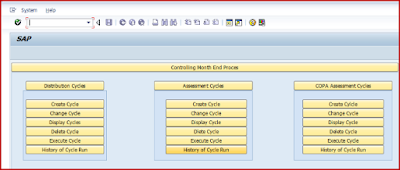
Module pool for CO Month End Process

Thursday, 5 November 2015

Error FS 861 in External Tax System

The purpose of this blog is help to identify the root cause of error FS 861 in External Tax System (SABRIX, VERTEX and TAXWARE).

Error FS 861 can be a generic error resulted from RFC_CALCULATE_TAXES_DOC when external tax calculation is used. The cause can be wrong jurisdiction code, jurisdiction code structure, country not supported and so on.

The steps bellow should be followed to identify the root cause of error FS 861.

1. Check if company code is US,CA,PR:

According with SAP Note 1738657, SAP supports external tax systems only for the country codes US, CA and PR (Puerto Rico). This means the country of the company code must be one of these countries so that taxes are calculated using the external tax system and are also updated there.

Monday, 12 October 2015

Most unnoticed functionalities in SPRO

As a functional consultant, we might have seen SPRO screen day in and day out. But, many of us may have missed to notice, there are many additional functionalities available in SPRO. Usually, we just run to the node where we wish to do the changes, complete required changes and rush for testing.

Through this blog, I would like to bring to the notice of fellow community members about many unnoticed functionalities available in SPRO.

1. How to find the list of tables that are updated through particular SPRO node?

Place cursor on the node where changes are being done and go to below path in SPRO.

SAP FICO SPRO
In next screen, double click on underlying view.

Thursday, 1 October 2015

COPA Planning

Planning is a key tool available in Profitability Analysis (COPA), which is widely used to plan for annual forecast for Profitability Plans and track the actuals against the planned figures.  Planning in Profitability Analysis allows to plan Sales, revenue and profitability data in any selected profitability segments.  The planning data can be displayed in various ways, depending on business demands. It is not a standalone component. It can not only send data to other applications but it can also receive planning data from those applications. It is also not limited by any specific time frame. The planning can be done more than one fiscal year at one or on a rolling basis. The data can also be planned by posting periods or calendar weeks. It is also possible to create and store planning data in different plan versions.

The planning framework is the main working environment for sales and profit planning. It contains all possible settings for building the planning framework. The planning can be carried out from this framework screen. MS Excel can be used as a planning screen for planning data in the SAP system. The planning framework allows for planning with or without MS Excel. The various ways in which manual planning can be executed are as under

Sunday, 13 September 2015

KP06 Excel Upload

Creation of Planning Layout
Go to t.code: KP65

KP06 Excel Upload

Click on Create

Select the Version, Period and Fiscal year in the General Data Selection in the Menu Bar Edit --> Gen data selection --> Gen data selection

Sunday, 16 August 2015

Mass Creation of Vendor (Supplier) Master Records through LSMW

Easy 12 steps for mass creation of vendors(suppliers) using Legacy System Migration Workbench - SAP Standard Tools.

Step 1: Maintain Object attributes
Step 2: Maintain Source Structures
Step 3: Maintain Source Fields
Step 4: Maintain Structure Relations
Step 5: Maintain field mapping and conversion rules
Step 6: Maintain fixed values, translations, user-defined routines
Step 7: Specify files
Step 8: Assign files
Step 9: Read & Display imported data
Step 10: Convert and Display converted data
Step 11: Create batch input session
Step 12: Execute Batch Input Session

First, call Legacy System Migration Workbench by entering transaction code LSMW.

Thursday, 13 August 2015

Distinguish FI Documents Doc Type for corresponding Controlling Documents

Probably we may have noticed that all FI documents for corresponding controlling document that are generated from the controlling application component is most of the times same i.e. AB or any other document type that we might have configured.

However there might be a Business Requirement that we should be able to distinguish the FI documents that are generated because of the corresponding controlling document from other FI documents generated out of non-controlling application component.

How to address this Business Requirement
  • First: We can definitely look at the business transaction from FI Table – BKPF & BSEG and Text field in BSEG in order to check if the FI document is related to a Controlling Document however this may not be very handy as more analysis might be required.
  • Second: We can create & designate a different document type for the FI postings that are generated because of corresponding controlling document posting and in that way only by referring the document type it is quite easier to identify instead of depending on text or business transactions.
Now the question comes where we configure the Document Type that is used for FI posting for a controlling document: